



Airport Pickup Delay Policy: Price and Wait Time
Explains 45-minute airport and 15-minute city free waits, how flight tracking starts the clock at landing, and when extra charges or rebooking apply.
Airport Pickup Delay Policy: Price and Wait Time
If your flight lands late, your airport transfer price usually stays the same. What can change the cost is how long you take to reach the driver after landing. In most cases, you get 45 minutes of free waiting time for airport pickups, and that clock starts from the actual landing time, not the scheduled one.
So I’d keep these points in mind:
- Flight delays before landing are usually covered if I added my flight number.
- Delays inside the terminal are different. Passport control, baggage reclaim, and finding the exit all use up the free waiting time.
- Airport pickups usually include 45 minutes free.
- City pickups usually include 15 minutes free.
- After that, I may pay extra waiting charges.
- If I do not contact the driver or support in time, the booking may be marked as a no-show, and I may need a new booking.
A few timings matter most:
- If my flight was due at 14:30 but lands at 16:15, the waiting clock starts at 16:15.
- For many arrivals in Spain, Schengen passengers may get out in about 30–40 minutes.
- Non-Schengen passengers may need about 60 minutes, which can go past the free 45-minute window.
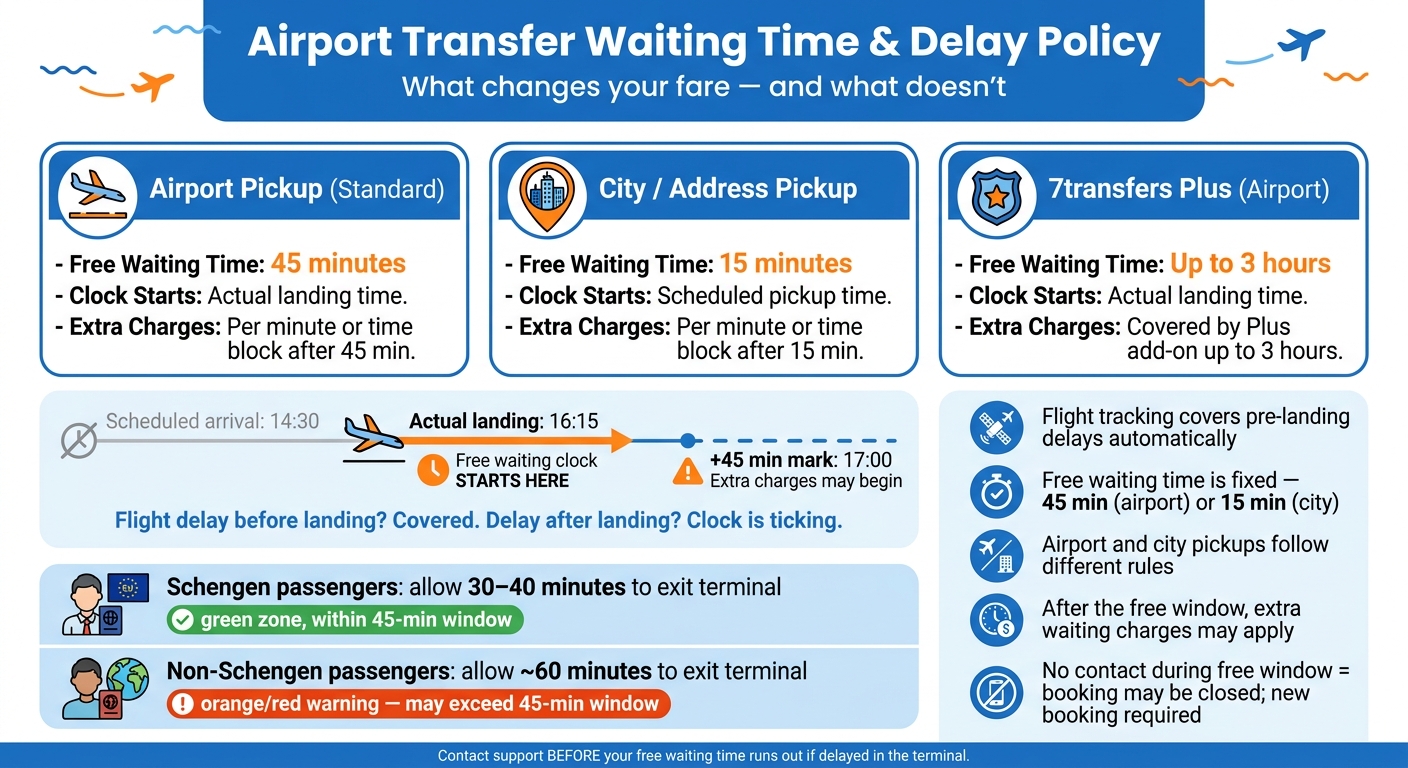
Airport Transfer Waiting Time & Delay Policy at a Glance
Quick comparison
| Pickup type | Free waiting time | Clock starts | After free time |
|---|---|---|---|
| Airport pickup | 45 minutes | Actual landing time | Extra charges may apply |
| City/address pickup | 15 minutes | Booked pickup time | Extra charges may apply |
| 7transfers Plus airport pickup | Up to 3 hours | Actual landing time | Covered by the add-on up to that limit |
My simple takeaway: a late flight does not usually change the transfer fare, but a long delay after landing can. So if I’m stuck in the terminal, I’d contact support before the free waiting time ends.
sbb-itb-ff87004
How flight tracking affects pickup timing and protects your fare
Flight tracking keeps airport pickups in step with your actual arrival when plans shift. If you add your flight number when booking, the driver can follow your flight in real time, and the pickup time updates on its own.
That matters for your fare too. The pre-landing timing is covered, and the next timer starts only when you need to meet the driver. For tracked airport pickups, the free waiting window stays tied to post-landing delay.
When the free waiting clock starts
For tracked airport pickups, the 45-minute complimentary waiting window starts from your actual landing time, not the original scheduled arrival time.
So if your flight was meant to arrive at 14:30 but lands at 16:15, the waiting clock starts at 16:15.
How 7transfers handles tracked airport pickups
With 7transfers, real-time flight tracking updates the driver’s arrival once you provide your flight number. The driver meets you in the arrivals hall.
When long delays may still require manual changes
There’s one catch: tracking only works while the flight can still be traced. If your flight is cancelled, the flight number changes, or the disruption pushes your arrival to another day, you’ll need to contact support directly using the number in your booking confirmation.
In those cases, you may need to reschedule the transfer or book a transfer online. After landing, the next cost factor is how fast you get to the meet-and-greet point.
Meet and greet timing and the free waiting window
Where and when the driver meets you
Your booking confirmation shows the exact meeting point. That’s also where the driver will be waiting with a name sign. If you don’t spot the driver straight away, check the confirmation email and call the number listed in your booking details.
This part matters more than it may seem. Time spent looking for the driver comes out of your free waiting window, so a long search can lead to extra charges.
Standard waiting times for airport and city pickups
Free waiting time depends on the pickup type. For city or address pickups, you get 15 minutes from the scheduled pickup time.
Here’s how the waiting window works across the main pickup types:
| Pickup Type | Free Waiting Time | Clock Starts |
|---|---|---|
| Airport pickup | 45 minutes | At actual landing time |
| City/address pickup | 15 minutes | At scheduled pickup time |
| 7transfers Plus (airport) | Up to 3 hours | At actual landing time |
If that free window runs out, waiting may become chargeable, which the next section covers.
Recommended time buffers for arrivals in Spain
For arrivals in Spain, the big variable is the time needed for customs and baggage reclaim.
- Schengen arrivals: if you’re flying from within the EU/Schengen zone, allow around 30–40 minutes to leave the airport and get to the meeting point.
- Non-Schengen arrivals: allow closer to 60 minutes. Passport control queues and baggage reclaim can eat into the 45-minute airport waiting window.
When extra waiting charges start and how costs are calculated
How waiting time is charged after the free window ends
Once the free waiting window ends, pricing changes. Extra waiting is billed separately according to our Help & Support guidelines from the transfer fare. In most cases, the charge is applied per minute or by a time block.
Comparison table: pickup type, free waiting time, and when charges begin
Use the table below to check when waiting starts to cost extra.
| Pickup Type | Free Waiting Time | When Extra Charges Begin | Billing Method |
|---|---|---|---|
| Airport Pickup (Standard) | 45 minutes | After the 45-minute window ends | Per minute or time block |
| City / Address Pickup | 15 minutes | After the 15-minute window ends | Per minute or time block |
| 7transfers Plus (Airport) | Up to 3 hours | After 3 hours | Included in the Plus add-on fee |
When a new booking is needed and the key rules to remember
Situations that can lead to a no-show or rebooking
Once the free waiting window ends, the issue isn't just about delay fees anymore - it shifts to the status of the booking itself.
A booking is usually marked as a no-show when the passenger doesn't arrive at the meeting point, or hasn't contacted the driver or support during the free waiting window.
Other common reasons are delays that go past the tracking window, missing the meeting point instructions in the confirmation email, or getting held up at customs or baggage reclaim without contacting support. If it looks like you're going to miss the free window, call the driver or contact support before time runs out.
Once support marks a booking as cancelled or no-show, it can't be switched back on. You'll need to make a completely new reservation.
How 7transfers cancellation and support work during delays
If a delay turns into a same-day issue, support decides whether the transfer can still be changed.
7transfers offers free cancellation up to 24 hours before pickup for standard bookings. The 7transfers Plus add-on cuts that window to 6 hours before pickup. If you can't find your driver, or you're stuck at customs or baggage reclaim, 24/7 support is available by phone, WhatsApp, Telegram, or email.
At that stage, it usually comes down to two things: is the transfer still valid, and will waiting or rebooking cost extra?
Conclusion: five rules to remember
- Flight tracking covers pre-landing delays, up to 3 hours with 7transfers Plus.
- Free waiting time is fixed - 45 minutes for airport pickups and 15 minutes for city pickups.
- Airport and city pickups follow different rules - don't assume both use the same waiting time.
- After the free window, extra waiting charges may apply.
- If there's no contact during the free window, the booking may be closed and a new one may be needed.
FAQs
What if my baggage is delayed?
If your baggage is delayed, there’s no need to panic. For airport pickups, 7transfers includes 45 minutes of free waiting time from the moment your flight lands.
Your driver follows your flight in real time, so they’ll know if you arrive a bit later than planned. If baggage claim looks like it will take more than 45 minutes, please contact 7transfers 24/7 customer support to check possible extra waiting arrangements or charges.
How do I avoid a no-show?
Provide the correct flight number when booking so 7transfers can track your arrival and adjust the pickup time if your flight is delayed.
After landing, you get a 45-minute free waiting period. If you expect any issues, contact 7transfers support straight away for help.
Can I reschedule after a flight cancellation?
Yes - you can reschedule your booking if your flight is cancelled, subject to vehicle availability.
Just contact 7transfers as soon as possible and share your booking reference.
Changes to the date, time, or route may affect the final price. If you have 7transfers Plus, you may be able to make free changes up to 6 hours before pickup. If not, the standard modification policy applies.