



How to Add Child Seat to Transfer
Book an approved child seat 24+ hours before Spanish transfers; provide your child’s height, weight, flight info and confirm approval label.
How to Add Child Seat to Transfer
If your child is under 135 cm in Spain, I need to book the right child seat before the transfer.
Here’s the short version: I should book at least 24 hours ahead, add the seat in the booking form or request it by phone, and give the child’s height, weight, and age. For airport pickups, I also need the flight number so pickup time can be checked if the flight is delayed.
Before I pay, I make sure I have:
- Pickup and drop-off details
- Date and time in dd/mm/yyyy and 24-hour format
- Flight number and terminal for airport pickups
- Passenger and luggage count
- Child’s height (cm) and weight (kg)
- Seat type and number of seats needed
A few points matter most:
- In Spain, children under 135 cm must use an approved restraint.
- The right seat is based on height and weight, not only age.
- The seat should have an ECE R44/04 or UN R129 (i-Size) label.
- Airport pickups include 45 minutes of waiting time after landing.
- Non-airport pickups include 15 minutes of waiting time.
- If plans change, I should update the booking and ask for written confirmation that the child seat is still included.
| What I need to check | What matters |
|---|---|
| Seat rule | Child under 135 cm needs a child restraint |
| Best way to choose | Use height and weight |
| When to book | At least 24 hours before |
| Airport detail | Add flight number and terminal |
| At pickup | Check seat type, fit, and approval label |
In other words: I don’t leave the child seat to chance. I add it early, check the booking email, and confirm the seat again at pickup.
Child seat rules for transfers in Spain
For private transfers in Spain, the child seat you add needs to match your child’s size and the vehicle’s approved restraint rules.
When a child seat is required
In Spain, any child under 135 cm in height must travel in an approved child restraint. The right seat depends on height and weight, not just age.
If you’re booking a private transfer in advance - from airport pickups to intercity journeys - you should request the correct child seat during the booking process.
Seats must comply with one of these two European approval standards:
- ECE R44/04, which is based on weight
- UN R129, also called i-Size, which is based on height
Which seat type fits your child's age, height and weight
Before you confirm the transfer, check your child’s exact height and weight. That’s what determines the right seat. Age can help as a rough guide, but it’s not the main factor.
| Seat Category | Typical Use | Approval Standard |
|---|---|---|
| Infant carrier | Smallest passengers, rear-facing | ECE R44/04 / UN R129 i-Size |
| Forward-facing child seat | Toddlers and young children with integrated harness | ECE R44/04 / UN R129 i-Size |
| Booster seat | Older children using the vehicle's seatbelt with a raised base | ECE R44/04 / UN R129 i-Size |
Two children who are close in age may still need different seats if their height or weight is different. With 7transfers, enter your child’s exact height and weight so the right seat is assigned. Add both details in the booking form so the seat provided matches your child.
Before booking, have those measurements ready. It makes choosing the right category much easier.
sbb-itb-ff87004
Details to prepare before you book
Once you’ve worked out the right seat type, get your booking details ready before you open the form. It makes the whole thing smoother and helps avoid small mistakes that can turn into a headache later.
Trip details to have ready
You’ll need the full pickup and drop-off addresses, the date in dd/mm/yyyy format, and the pickup time in 24-hour format. For example: 17/09/2026 at 18:30. This cuts out mix-ups with AM/PM and date order.
If you’re booking an airport pickup, include the flight number and terminal too. That lets the driver track arrival changes and adjust the pickup time if needed. Airport pickups come with 45 minutes of complimentary waiting time from the moment the flight lands, while pickups from a street address include 15 minutes.
You should also have your total passenger count and luggage details ready. Include suitcases, hand luggage, and any bulky items like a pram or pushchair. That gives the provider what they need to assign the right vehicle class.
Child details to provide
For each child travelling, prepare their age, height, and weight. These are the details used to match the right seat category.
You should request child seats during the initial booking, say how many you need, and name the type required: baby seat, child seat, Maxi-Cosi, or booster. Child seats are subject to availability.
| Detail | What to provide | Why it matters |
|---|---|---|
| Date and time | dd/mm/yyyy, 24-hour format (e.g., 17/09/2026 at 18:30) | Prevents scheduling errors |
| Flight number and terminal | Full flight code and terminal | Enables flight tracking for airport pickups |
| Passengers and luggage | Total count, suitcases, hand luggage, prams or pushchairs | Helps assign the correct vehicle size |
| Child measurements | Age, height (cm), weight (kg) | Helps match the right seat category |
| Number of child seats | How many seats are needed and the type | Confirms the correct equipment is requested |
With these details ready, you can add the child seat during booking without any back-and-forth.
How to add a child seat during booking and confirm it
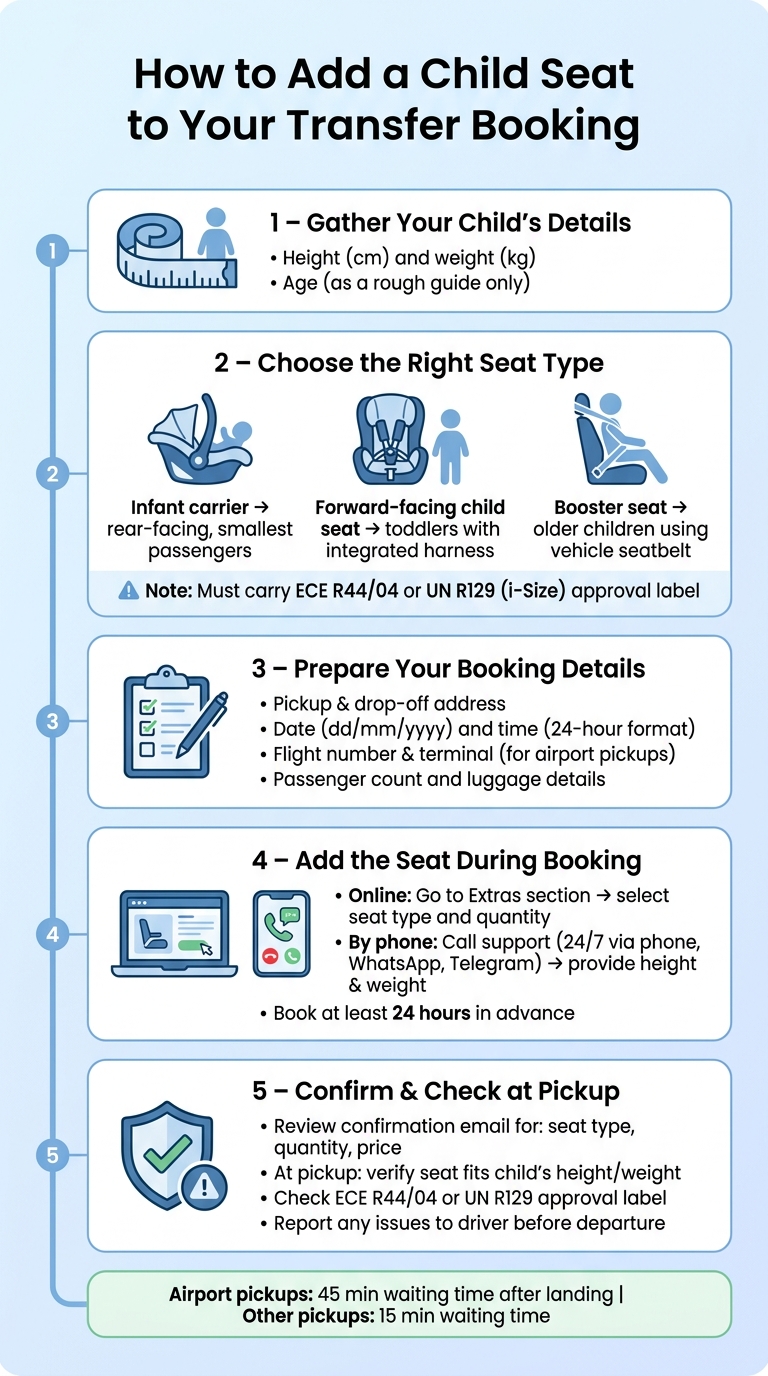
How to Add a Child Seat to Your Transfer Booking in Spain
Once you have your child’s measurements and trip details, you can add the seat during booking or request it by phone. 7transfers supports both, so the main thing is simple: pick the right seat type and review the confirmation with care.
Add a child seat in the online booking form
Enter your route, date, time, and vehicle class, then go to the Extras section and add the child seat there. Choose how many seats you need and select the seat type that fits your child.
If there’s an extra charge, it will appear in the total price in € before payment. That way, you can check the full cost before you finish the booking.
Request a seat by phone and get written confirmation
If you want help picking the right seat, call before you complete the booking. Share your child’s height in cm and weight in kg so the team can match the seat properly. 7transfers offers 24/7 support by phone, WhatsApp, and Telegram.
Once the booking is confirmed, review the email and make sure it clearly shows:
- seat type
- quantity
- price
That written confirmation matters. It gives you something clear to check before pickup.
Online booking vs phone booking: a quick comparison
| Feature | Online booking | Phone booking |
|---|---|---|
| Information required | Route, date and time, vehicle choice, extras selection | Booking reference or trip details, child's height and weight, seat type |
| Best use case | Quick, standard bookings | Travellers who want help choosing the right seat |
| Main advantage | Fast booking with immediate confirmation | Personalised support and direct verification |
| Confirmation | Immediate via email | Written confirmation after the call |
Next, check the seat at pickup and update the booking if your flight or transfer details change.
Check the seat before travel and update your booking if plans change
Check seat size, approval label and fit at pickup
After booking, do one last check at pickup. That way, you can make sure the seat still suits your child and that the booking still lines up with the trip.
At pickup, compare the seat with your child’s height and weight, then check the approval label. Use your confirmation email and booking reference to confirm the seat request. Look for an ECE R44/04 or UN R129 approval label on the seat. These labels show that the seat meets European safety standards. If the seat doesn’t fit your child or doesn’t have an approval label, tell the driver before departure.
What to do if your flight, terminal or pickup details change
If your trip details change after booking, update them before pickup. The earlier you report changes, the better the chance the driver arrives with the right seat and the right pickup details.
For airport transfers, flight tracking adjusts pickup timing for normal delays. But major schedule or terminal changes are a different story, so report them straight away. If your flight number changes or your pickup address is different, contact support with your booking reference. Then ask for written confirmation that the child seat request is still attached to the updated booking.
Conclusion: key steps to get the right child seat for your transfer
Before pickup, check the seat, verify the approval label, and report any booking changes straight away.
FAQs
What if I forget to book a child seat in advance?
If you forgot to book a child seat in advance, contact 7transfers as soon as possible and share your booking reference to ask for a child seat or booster. This depends on availability and, on some routes, there may be a small extra charge.
If any part of your trip has changed - such as the date, time, route, or number of passengers - confirm the new details when you request the seat. Those changes can also affect the price.
Can I bring my own child seat instead?
For your transfer with 7transfers, child seats, baby seats, and Maxi-Cosi options are available on request, so your little ones can travel safely and in comfort.
To make sure everything is set up properly and fits the vehicle, please request the seat type you need when you book. That way, it will be ready and installed before pickup.
What if the child seat at pickup is wrong?
If the child seat provided at pickup is incorrect, contact 7transfers as soon as possible. The customer support team is available 24/7 to help with any issues.
Have your booking reference ready so the situation can be handled promptly.