



Private Transfer Phone Booking: Full Guide
Phone booking guide for private transfers: what to have ready, what to ask, payment steps, waiting times and support.
Private Transfer Phone Booking: Full Guide
If I want to book a private transfer by phone, I need four things first: route, date and time, passenger and luggage count, and the flight number. With that, I can get a quote, confirm extras like child seats, pay, and receive the booking by email, SMS, or WhatsApp.
Here’s the short version:
- I call +34 960 000 800 for Spain bookings.
- I give the pickup and drop-off details, plus date and time in 24-hour format.
- I confirm how many people and bags are travelling.
- I share the flight number so the driver can track delays.
- I ask for extras like booster seats, wheelchair access, or extra stops.
- Before I pay, I check the total price in €, waiting time, and cancellation deadline.
- After booking, I save the reference number and meeting point details offline.
A few numbers matter here. Airport pickups usually include 45 minutes of waiting time after landing, while city and departure pickups usually include 15 minutes. Free cancellation is usually available more than 24 hours before pickup. And if my flight number changes, I should report it at once so tracking still works.
This guide is about one thing: how to make the phone call, what to say, what to check, and what to do after booking.
What to have ready before you call
Before you call, get the main details in front of you: route, timing, passenger count, and luggage. Those are the points that shape the quote and help the company assign the right vehicle.
Trip details the booking agent will ask for
The agent will ask for your full pickup and drop-off addresses, along with the exact number of passengers and bags, so the right vehicle is assigned.
For airport transfers, give the terminal as well as the airport name. For hotel pickups, give the hotel name. If you're being picked up from an apartment or private address, include the street, building number, and entry details such as gate code, floor, buzzer, or any access notes.
| Detail | What to provide |
|---|---|
| Travel date | Local date in DD/MM/YYYY format (for example, 15/03/2027) |
| Pickup time | 24-hour format (for example, 14:30, not 2:30 PM) |
| Flight number | Airline and flight code (for example, IB3456) for real-time tracking and delay adjustments |
| Passengers | Total count, including children and infants |
| Luggage | Number of standard suitcases and hand-luggage items separately |
Even if the pickup time is fixed, include your flight number. That lets the driver track delays and adjust collection if needed.
Once that part is sorted, mention any extras.
Special requests to mention on the call
If you need child seats, say so at the start of the call. Be specific about the type and quantity: infant seat (Maxi-Cosi), baby seat, or child booster. If someone in your group uses a wheelchair or another mobility aid, mention that straight away so the right vehicle can be reserved.
For return trips, have the date, time, and pickup point ready, and book both legs in the same call. Also mention any extra stops. If the pickup is from a cruise terminal, apartment complex, or a building with restricted access, describe the exact meeting point - reception desk, main gate, or a specific entrance - so the driver goes to the right spot.
sbb-itb-ff87004
How the phone booking process works
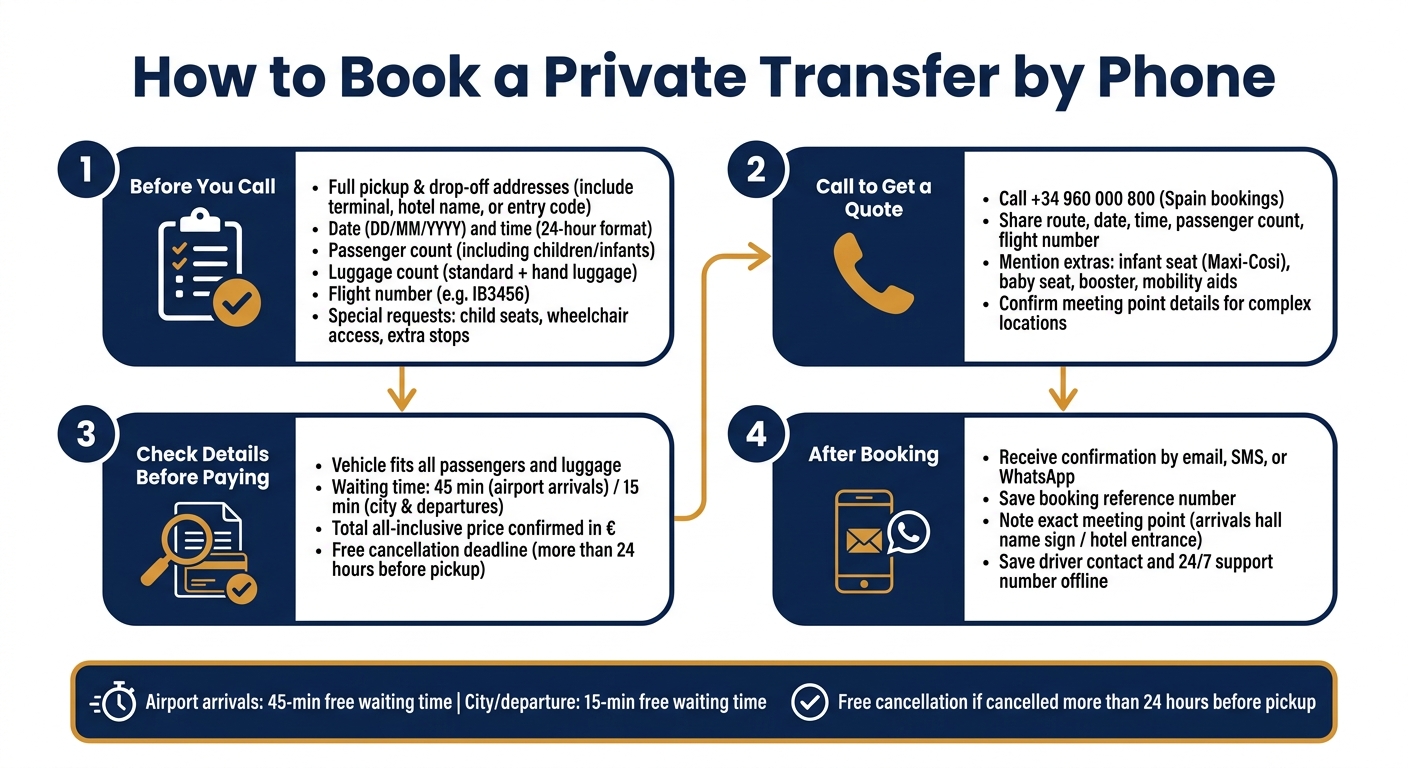
How to Book a Private Transfer by Phone: Step-by-Step Guide
Once you have your details ready, the call usually goes from quote to confirmed booking in just a few minutes. After that, your confirmation becomes the main reference for pickup, changes, and support.
Step by step: from quote to confirmation
- Call 7transfers - use +34 960 000 800 for Spain-based bookings.
- Confirm your trip details - share the route, date, time, passenger count, and flight number.
- Add any special requests - this can include child seats, extra stops, or mobility needs.
- Review, pay, and confirm - check the fixed all-inclusive quote, pay securely, and get confirmation by email, SMS, or WhatsApp.
Save the confirmation message as soon as it arrives. It includes your booking reference and pickup instructions. Keep it close at hand on the day of travel, and use it if you need to deal with any last-minute updates.
What to check before you pay
Before you go ahead with payment, take a minute to review the booking details. That small check can save a lot of hassle later.
| Booking detail | Why it matters | What to check |
|---|---|---|
| Vehicle capacity | Makes sure everyone and their luggage can travel without being squeezed in | Passenger count and luggage allowance for the selected vehicle class |
| Included waiting time | Helps you avoid extra charges if there’s a normal delay | 45 minutes for airport pickups; 15 minutes for city addresses |
| Total price | Shows the final amount before the transaction | All-inclusive status and quoted currency (€) |
| Cancellation terms | Helps if your plans change | Check the free-cancellation deadline before paying |
After payment, the confirmation becomes your go-to reference for pickup, meet and greet, and support.
After booking: pickup, meet and greet, changes, and support
Once your booking is confirmed, check the key details for travel day: your meeting point, the driver contact details, and what to do if your plans change.
What to expect at airport and city pickups
Your confirmation includes the exact meeting point for your transfer. For airport arrivals, the driver will meet you inside the arrivals hall with a personalised name sign. For airport departures and city pickups, the driver will usually meet you at the hotel entrance or reception, or at the exact address shown in your booking.
7transfers tracks airport arrivals in real time. So if your flight is delayed or lands early, the pickup time adjusts automatically. If your flight number changes after booking, contact support straight away so tracking stays correct.
| Transfer Type | Meeting Point | Flight Tracking | Waiting Time |
|---|---|---|---|
| Airport Arrival | Arrivals hall, with a name sign | Yes, real time | 45 minutes from landing |
| Airport Departure | Hotel entrance or reception | No | 15 minutes |
| City Transfer | Exact address / hotel entrance | No | 15 minutes |
If you can't find your driver, call the number in your confirmation. If you still need help, 7transfers offers 24/7 customer support by phone, email, WhatsApp, and Telegram.
Before travel day, it helps to compare these details with the final checklist below.
Changes, cancellations, and urgent updates
If your plans change, contact 7transfers and share your booking reference. In most cases, you can request changes to the pickup time, date, route, vehicle type, or passenger count. Support will confirm availability and let you know if there’s any fare difference.
Cancellations are free if made more than 24 hours before the scheduled pickup. Your confirmation shows the exact local deadline, so check that first rather than guessing. Bank or card fees are non-refundable.
| Scenario | Action Required | Policy |
|---|---|---|
| Routine change | Contact support with booking reference | Subject to availability; may affect price |
| Flight-number update | Notify support immediately | Essential for accurate tracking |
| Cancellation more than 24 hours before pickup | Use the link in your confirmation or contact support | Free of charge; transfer fare refunded |
| Last-minute change | Contact 24/7 support immediately | Subject to availability; fees may apply |
| No-show or missed pickup | Contact support immediately | Typically charged in full |
Use your confirmation as the main reference for travel day.
Final checklist and conclusion
Your confirmation email is the main reference for your booking. It’s the final check after a phone booking and before pickup. If anything looks wrong, contact 7transfers support straight away and ask for a written correction.
Before travel day, use this checklist to verify every detail in your confirmation.
Confirmation checklist before travel day
| What to Check | What to Verify |
|---|---|
| Booking reference | Saved and ready to quote to support or the driver |
| Lead traveller name and mobile number | Matches the lead traveller and the number used for WhatsApp or SMS updates |
| Pickup & destination | Exact pickup and drop-off addresses |
| Date & time | Local date in DD/MM/YYYY format; time in 24-hour format (e.g., 07:30) |
| Flight number | Correct and up to date for automatic delay tracking |
| Vehicle type & luggage | Vehicle class fits your group; luggage count includes hand luggage |
| Special requests | Child seats, extra stops or other extras explicitly listed |
| Meet-and-greet instructions | Where exactly to meet the driver (arrivals hall, hotel entrance, etc.) |
| Waiting time | Waiting time shown correctly for your transfer type |
| Total price & payment status | Amount confirmed and payment completed |
| Cancellation deadline | Free cancellation deadline shown in the confirmation |
| Support contacts | Save the support number and any driver contact before travel day |
Save the confirmation offline on your phone. Also save any driver number sent by SMS or WhatsApp before pickup. Once you’ve checked each detail, you’re set for travel day.
FAQs
Can I book a return transfer in the same call?
Yes. You can book a return transfer in the same call. Just ask the support team to add the return journey.
You can also book the return trip separately if that works better for you. Return journeys can be set up with different pickup times and locations, so it’s easy to match your travel plans.
What happens if my flight is delayed or changes?
If you add your flight number at the time of booking, we track your flight in real time and adjust your pickup if it lands late or early, within normal monitoring limits.
Your driver will also wait 45 minutes from your actual landing time at no extra cost. On some bookings, flight delay protection can cover up to 3 hours of waiting. If you need help, customer support is available 24/7.
How will I receive my booking confirmation?
After you confirm your booking with 7transfers, you’ll get a confirmation email with your booking reference. Think of it as your main record for the service. It includes the key details you’re most likely to need, such as your service provider’s information and a support contact number.
If you share your contact details, you may also get service updates by SMS, WhatsApp, or other secure channels. These updates can cover things like your driver assignment, arrival, and service status.