



How Meet and Greet Pickup Works
A clear meet-and-greet pickup process: confirm booking, track your flight, meet the named driver, and check ID, luggage and child seats.
How Meet and Greet Pickup Works
With 7transfers, I meet my driver at the confirmed pickup point, check their name sign and follow them to the vehicle. Airport pickups include 45 minutes of free waiting from landing, so I contact the driver if passport control or luggage collection delays me.
Here’s my pickup checklist:
- Before travel: I check passenger details, flight number, luggage, confirmed seats or support needs, price and contact numbers.
- On arrival: I check flight updates and follow the exact meeting-point instructions - not assume the driver is inside arrivals.
- At the meeting point: I match the driver’s sign to my booking and keep my phone on. If we cannot find each other, I contact 24/7 support.
- Before and after the ride: I check child seats and the destination, then collect my luggage and belongings before the driver leaves.
My rule: <u>keep the confirmation handy</u>. Flight tracking does not replace a call, and extra waiting may cost more.
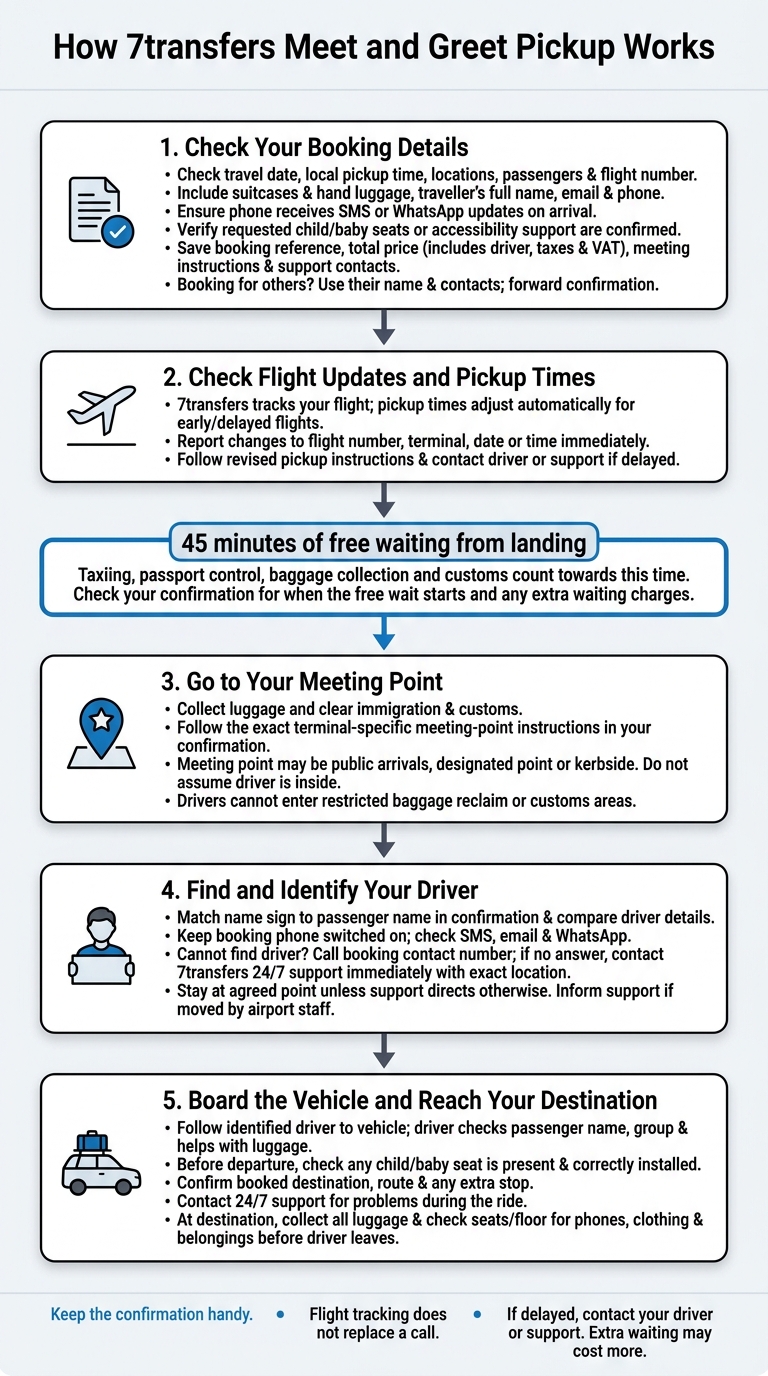
How 7transfers Meet and Greet Pickup Works
Step 1: Check Your Booking Details
When booking with 7transfers, enter your travel date, local pickup time, pickup and drop-off locations, and number of passengers. This helps the driver meet you at the right place and time. For airport pickups, include your flight number.
Add your luggage details, covering suitcases and hand luggage, so a suitable vehicle can be assigned. Provide the traveller’s full name, email address and phone number. Check that the phone can receive SMS or WhatsApp updates on arrival.
Request any child seats, baby seats, boosters or accessibility support when you book. Availability can vary, so check that the confirmation email lists each requested extra as confirmed.
Review your confirmation for the booking reference, total price - including the driver, taxes and VAT - meeting-point instructions and 24/7 support contacts. Booking for someone else? Enter their name and contact details, then forward the confirmation so they have the booking information and can receive driver updates directly.
Next, check your flight updates and pickup time.
sbb-itb-ff87004
Step 2: Check Flight Updates and Pickup Times
Once your booking is confirmed, keep an eye on your flight status in real time. 7transfers tracks your flight number to time the driver’s arrival around your landing. Pickup times adjust automatically if your flight arrives early or is delayed.
Taxiing, passport control, baggage collection and customs all count towards your 45 minutes of free waiting time. Check your confirmation to see when that free wait starts and what you’ll pay if you go over it. If you’re delayed, contact the driver or support straight away.
If your flight number, terminal, date or time changes, report it straight away using the contact details in your confirmation. This lets the driver receive the update before you arrive. Follow the revised pickup instructions to your meeting point.
Step 3: Go to Your Meeting Point
Collect your luggage and clear immigration and customs before heading to arrivals. Then go to the meeting point listed in your confirmation. Your driver cannot enter restricted baggage reclaim or customs areas.
Where airport rules allow, your driver will wait in the public arrivals area with a name sign. However, your confirmed meeting location may be a designated meeting point or kerbside pickup area, so don’t assume the driver will be inside the terminal.
Follow the terminal-specific instructions in your confirmation rather than general airport signs. If you can’t find your driver, call the number in your booking details. If they don’t answer, contact 7transfers’ 24/7 customer support immediately.
Step 4: Find and Identify Your Driver
At the agreed meeting point, look for a driver holding a sign with your booking name. Check that the name matches the passenger name in your confirmation, and compare any driver details with your booking updates.
Keep the mobile phone linked to your booking switched on. Check SMS, email and WhatsApp for driver details or arrival updates. If anything doesn’t match, or you can’t identify your driver, contact 7transfers support through the contact method listed in your booking. Tell them your exact location.
Stay at the agreed meeting point unless support directs you elsewhere. If airport staff ask you to move, let support know your new location. If your flight, terminal or exit changes, tell support exactly where you are and stay reachable until your driver finds you.
Once you’ve identified your driver, follow them to the vehicle.
Step 5: Board the Vehicle and Reach Your Destination
Once you’ve identified your driver, follow them to the vehicle. They’ll check the passenger name and your group, then help with your luggage.
Before departure, check that any child or baby seat is present and correctly installed. Confirm your booked destination, route and any extra stop with the driver, too.
If there’s a problem during the ride, use the contact details in your booking confirmation to reach 7transfers support, available 24/7.
At your destination, collect all your luggage. Before the driver leaves, check the seats and floor for phones, clothing and other belongings.
Conclusion: Keep Your Pickup Details Handy
Keep your confirmation handy before you travel, follow the meeting-point instructions and check your driver’s identity before boarding.
Flight tracking does not replace contact: if customs or baggage collection holds you up, let your driver or support know. You may be charged for extra waiting once the included waiting time ends.
Save your confirmation, booking reference and support contacts on your phone. That way, you can call your driver or 7transfers support straight away if you cannot find your driver.
FAQs
What if I cannot contact my driver on arrival?
If you can’t find your driver when you arrive, check the meeting instructions in your booking confirmation first. Still can’t find them? Call the driver using the phone number in your booking details.
You can also contact 7transfers customer support immediately. Our team is available 24/7 to help your pickup go smoothly.
Will my driver wait beyond the free 45 minutes?
Yes, your driver can wait beyond the 45 minutes of free waiting time included with your airport pickup. Extra charges may apply if you need more time. Your driver or the 7transfers support team will let you know if there’s a charge.
What if my confirmed child seat is missing?
If your driver arrives without your confirmed child seat, check the meeting instructions in your booking confirmation. Then call the driver immediately using the number in your booking details, or contact 7transfers customer support for help.
Our team is available 24/7 to help resolve the issue so you can continue your journey safely and comfortably.