


Airport Transfer Lost Item FAQ
How to report and recover items left in airport transfers: who to contact, what details to provide, urgent steps, and return options.
Airport Transfer Lost Item FAQ
Lost something during your airport transfer? I’d contact the operator in your booking confirmation straight away. For 7transfers, reply to your confirmation email or email booking@7transfers.com. Support is available 24/7, but vehicle checks may take time.
Here’s what I’d do next:
- Send the trip and item details: booking reference, travel date and local time, contact details, item description and where you last saw it.
- Check both locations if unsure: report it to transfer support and the airport’s lost-property office.
- Act on urgent losses: mention your departure deadline, freeze missing bank cards, lock a lost phone, and seek help for a missing passport or medication.
- Agree the return in writing: confirm ownership, collection or delivery details, and any fee before handover - even if you want it returned during another transfer.
<u>Recovery and return times aren’t guaranteed.</u> I’d keep updates in the same email thread and share identifying details privately, without passwords or full payment details.
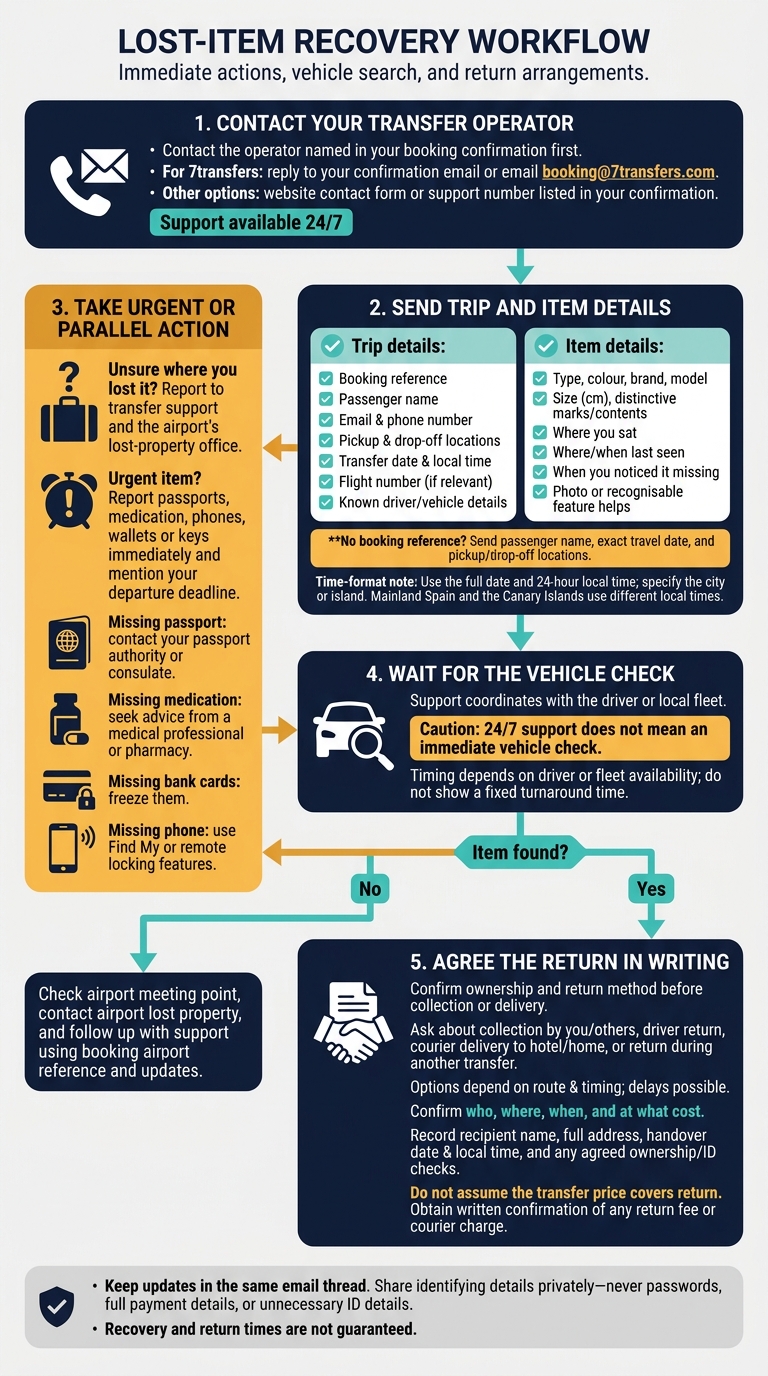
Airport Transfer Lost Item Recovery Steps
Who to Contact About a Lost Item
If you left an item in the transfer vehicle, contact the operator named in your confirmation first. The vehicle may not be checked straight away, and there’s no guarantee your item will be recovered.
How to Contact 7transfers Support
You can reach 7transfers support 24/7. Reply to your confirmation email, use the website contact form, email booking@7transfers.com, or call the support number listed in your confirmation.
What to Do If the Item Is Urgent
Report a lost passport, medication, phone, wallet or keys immediately. Mention any departure deadline so the team knows how much time you have.
For a missing passport, contact your passport authority or consulate. If you need replacement medication, seek advice from a medical professional or pharmacy. Freeze missing bank cards, and use your phone’s Find My or remote locking features.
Then add the item’s details and its last known location to your report.
sbb-itb-ff87004
Details to Include in Your Report
Include as much trip information as you can to help support find your item sooner.
Booking and Journey Details
Share your booking reference, passenger name, email address and phone number, along with the pickup and drop-off locations. Add your flight number if relevant, plus any driver or vehicle details you know. These details help support match your report to the journey.
Give the transfer date and local time, using the full date and 24-hour format:
8 October 2026 at 09:30
Specify the city or island, as mainland Spain and the Canary Islands use different local times.
Can't find your booking reference? Provide the passenger name, exact travel date, and pickup and drop-off locations.
Item Description and Last Known Location
Describe the item’s type, colour, brand, model and size in centimetres. Include any marks that set it apart or details of its contents.
Explain where you sat, where you last saw the item and when you noticed it was missing. Mention whether it might be in a seat pocket, on the floor or in the boot.
Send identifying details privately to support. Do not share passwords, full payment details or unnecessary ID details. A photo of the item or a recognisable feature can help the driver identify it.
Support will use this information to check the vehicle and let you know the next step.
Vehicle Checks and Response Times
Support arranges the vehicle search with the driver or local fleet.
Where the Driver May Look
The driver or fleet checks the vehicle and records any items they find.
When to Expect an Update
After support requests a search, the timing depends on when the driver or fleet can check the vehicle. 24/7 support does not mean an immediate vehicle check. You may need to wait for an update while support contacts them.
What to Do If the Item Is Not Found
If nothing turns up in the vehicle, check the next likely location. Start with the meeting instructions in your confirmation email - the item may have been left at the airport meeting point.
Follow up with support, providing your booking reference and any update from the airport’s lost-property office.
Getting a Found Item Back
Once support confirms your item has been found, use your booking reference to arrange its return. Confirm ownership and agree on the return method before booking collection or delivery.
Collection and Delivery Options
Ask support whether someone else can collect the item, the driver can return it, or a courier can deliver it to your hotel or home.
The options depend on the route and timing. The driver’s location, other bookings or the end of their shift may delay the return. If you have another transfer booked, ask whether you can receive the item then.
Before the item is released, agree on who will receive it, where, when and at what cost.
Handover Details and Return Fees
Confirm the recipient’s name, the full collection or delivery address, and the handover date and local time. Use the local time at the handover location, for example:
8 October 2026, 14:30
If someone is collecting on your behalf, agree their details with support first, along with any proof of ownership and ID checks.
Don’t assume the transfer price covers the return. Before agreeing, ask for written confirmation of any return fee or courier charge. Request the amount in euros with a decimal comma:
25,00 €
Conclusion: Steps to Recover a Lost Item
Report the lost item promptly so support can trace it, then confirm its return. For 7transfers bookings, reply to your confirmation email or email booking@7transfers.com.
Keep your booking reference handy and follow up in the same email thread. Wait for the vehicle check before expecting an update.
If the item is found, confirm the return method and any costs in writing before handover. Recovery and exact return times aren’t guaranteed.